Keynote is the Mac-version of Microsoft PowerPoint. Offering the same convenience to Mac, iPhone, and iPad for those who wish to create slideshows, Keynote enjoys wild popularity among Apple users. The thing is if you are willing to accept the highly developed AI into slideshow creations, saying use AI to create Keynote on your Mac without further configuring the transitions, filters, effects, and even content.
Read on to see the best free AI keynote generators you can find on the market.

- On This Page
- AI Is the Way to Quickly Create Keynote Slideshows on Mac
- AI Keynote Generator by Prompts
- AI Keynote Generator From Word/PDF - Slidespilot
- AI Keynote Generator - PowerPoint Enhancers
- Bonus Tip: Can I Convert PowerPoint to Keynote?
AI Is the Way to Quickly Create Keynote Slideshows on Mac
Magic AI has made it possible to create templates, content, images, and even videos and merge them all into a Keynote slideshow. Here are the advantages of using AI to create Keynote slideshows on Mac, iPhone, and iPad.
1. Instant text to Keynote slideshow
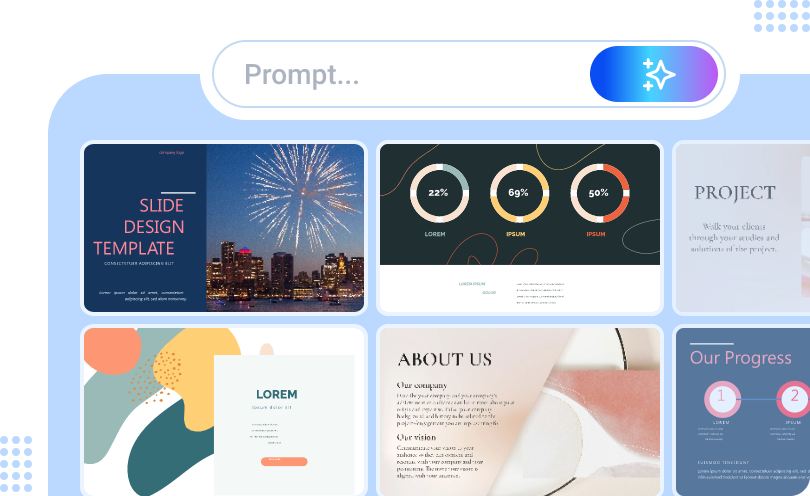
Users can access AI and input prompts to generate Keynote. Try to fill in texts like ‘Keynote featuring history presentation,’ and then generators will instantly create pitch decks that have exquisite image designs, icons and shapes, transitions, and effects.
2. Auto content filling based on your prompts
Offer more accurate prompts, and AI will generate relevant content based on your demands and manifest it on your pitch decks. These AI texts are generated by ChatGPT and other AI models, offering very authentic info background and standing firmly for your presentation.
3. Auto image embodiment based on your prompts
AI keynote creators can search or create AI images based on the prompts you provide.
4. Auto transitions and effects
Fade in, fade away, flash, dim, etc., transitions are core elements of good Keynote slideshows. You don’t need to manually set up the transitions between slides and slides, AI will do all the work perfectly.
5. Exquisite templates suit all user scenarios
Powerful AI keynote generators often adopt very sophisticated modes of mixed templates. Half AI-generated and half designer-made templates promise human aestheticism and AI efficiency.

Image resource: Apple Support
AI Keynote Generator by Prompts
Vidwud is a free and automatic AI PowerPoint Generator. This one-click solution can generate very delicate and detailed slideshows that adhere tightly to the topic you offer. The template is another merit worth mentioning, you can choose your keynote slideshow to be either professional or casual.
All the features are unlocked for free. You can edit, download and share your keynote anywhere you want.

How to use Vidwud AI PowerPoint Generator?
Step 1. Hit the button below to navigate to Vidwud.
Make AI Presentation Now
Step 2. Input prompts let AI understand your topic/theme.
Step 3. Here in step 3, you will see a brief outline generated by AI, adjust the structure.

Step 4. Preview your final keynote slideshow and edit online to make it perfect.

The core features of Vidwud
-
Totally free website, no coins needed
-
Generate pitch decks with AI content, images, and transitions effects
- No watermark tagged on your PPT
- Tons of themes to choose from
AI Keynote Generator From Word/PDF - Slidespilot
Allowing users to upload word, PDF, and PPT documents and do quick transformations to turn images and texts into keynotes. The operations are foolproof; just drag and drop to upload your documents, choose the template style you like, and wait for AI to do the rest of the work. Here in the image below, you can see the editor upload an article in doc format to Slidespilot and the conversion is pretty impressive.

Although we didn’t see any stunning AI designs, the layout and text arrangements are cool. The images are cohesive to the article topic. If you want to adjust details, you can edit your pitch deck right away.
The core features of Sldiesgo
-
Turn Word, PDF, and PPT to Keynote
-
Super fast generation, with no queue in line
- AI content embodiment by ChatGPT
- AI images generation according to article themes
AI Keynote Generator - PowerPoint Enhancers
Suppose you are already halfway through finishing your keynote slideshows but need some professional designing skills to take the pitch decks to the next level. In that case, you can consider using the latest AI PPT enhancer. It is a very intuitive workflow to achieve the smooth transformation from Microsoft PowerPoint to Keynote.

This site provides minimalistic templates to quickly bring vibe and aestheticism to plain PowerPoint slides. Meanwhile, you can translate the whole PowerPoint to any mainstream language in one click. Ready to experience this tool without spending a penny? Head to https://www.magicslides.app/tools/ppt-to-better-ppt
The core features of Magicslides:
-
AI enhances PPT, URL, and even YouTube videos to AI Keynote
-
Allow users to choose different AI models for different performance
- Tons of exquisite human-design templates to choose from
- Cooperate with Google Slides, Figma, ChatGPT and Chrome to initiate instantly
Notice: This site only accepts documents less than 5MB. And due to large website traffic, it will crush from time to time.
Bonus Tip: Can I Convert PowerPoint to Keynote?
You can freely transform PowerPoint to Keynote. Follow the instructions below to do the transformation:
- Open Keynote on your Mac.
- Click File > Open, then select your PowerPoint (.ppt/.pptx) file.
- Keynote will automatically convert it. Some formatting might need adjustments.
- Click File > Save As and choose Keynote (.key) format if needed.
So, AI Keynote Generators basically equal to AI PowerPoint Generators. But Which One Should You Use?
Both Keynote and PowerPoint are powerful presentation tools, but they cater to different users. Keynote is ideal for Apple users who prefer neat designs and a simple, free solution, while PowerPoint offers more advanced features, better compatibility, and is widely used by professional users.
- Use Keynote if you’re an Apple user who prioritizes design, simplicity, and free access.
- Use PowerPoint if you need more features, better compatibility, and professional business tools.
Conclusion
AI Keynote generators are revolutionizing the way we create presentations. We can use free AI tools to create neat business pitches, appealing slideshows, and educational presentation slideshows. The 3 tools we’ve recommended on this page can help you generate professional-quality slides with minimal effort. Don’t forget to use Vidwud AI PowerPoint Generator, a free AI website that offers quality services.
Free AI Presentation Maker - Text to PPT
-
Easy and free prompt-to-slideshow generator
-
Multiple themes & templates for beautiful PPT creation
- Perfect online slideshow for school project, business pitch, etc.
Make AI Presentation Now







![Best 5 Online AI PowerPoint Generator from Text [2025]](https://cdn.vidwud.com/blog_files/20250114/best-online-ai-powerpoint-generator-from-text.png)

